
We’re excited to announce the upgrade and renaming of our Registration Widget, formerly known as Embed Registration. Not much has changed, but we wanted to take you through the process of using this embed feature on your website.
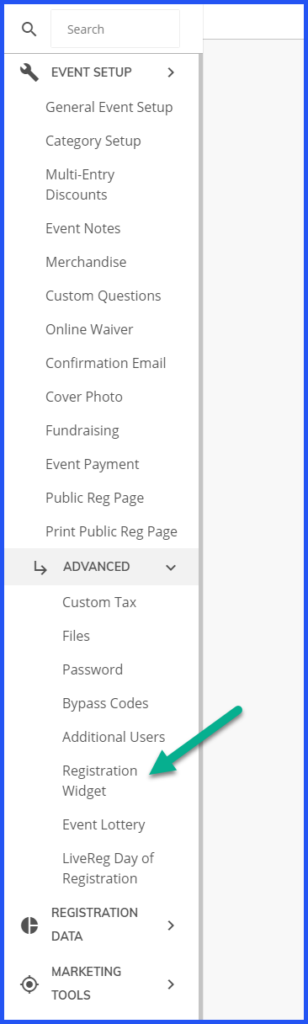
Step 1: Navigate to EVENT SETUP, scroll down to → ADVANCED, and then → REGISTRATION WIDGET.
Step 2: Check the box under “Enable Registration Widget”, and select your Header Style. In the first image, you can see that the “Minimal” setting provides a clean and simple experience, while the “Standard” setting is a bit more designed. If you have an image you’d like to use as the cover photo for your page, you can use the “Full Header” option, which can be found under the “Cover Photo” option in the EVENT SETUP menu (see image above).


Step 3: Finally, enter the URL that this widget will be displayed on (see image below). Copy the code using the clipboard tool, and paste into the HTML version of your website. Click Save.

If you have any issues with the functionality of the Registration Widget on our end, please let us know so we can help! However, if you have issues with the widget embedding in your website, contact your web manager or developer for troubleshooting.
Ask Us
As always, we’re here to help, and to hear your feedback. If you have questions about the widget, or need assistance with any other aspect of event promotion, please call us at 888.956.9560 or email support@athletereg.com.